Getting Started
The TIGER FORM API lets your server create forms, send or read submissions, download QR images, and receive webhook events. All paths live under https://api.form-qr-code-generator.com/v1. Every account has a monthly API request limit by plan (Freemium 500; Starter 10,000; Business 30,000; Professional 50,000; Enterprise — contact us or tiger-form@qrtiger.helpscoutapp.com — see Rate Limits & Retries). When the limit is reached, responses return HTTP 429.
- Copy your API key from Settings → Integration in the web app.
- Run End-to-End Integration Steps 1–5 (form → submission → read back → QR download). Uses bash + jq for cURL — or use SDK Examples (Node/Python). Already have a form? Skip Step 1 and set
QR_IDfrom the app orGET /forms. - When a call fails, check Error Model (404 = wrong URL, 401 = bad key, 400/403 = business rule or role). See also Common Mistakes.
What to read first
Pick one path by goal — you do not need every guide on day one.
| Your goal | Read in order |
|---|---|
| Code samples (Node / Python) | SDK Examples · full walkthrough: End-to-End Integration |
| Push or pull submissions on an existing form | Authentication → Create a Submission → Read Submissions (optional: Webhooks) |
| Create forms + QR from code | End-to-End Integration → Form Field Types → How to Customize Your QR Code |
| Push notifications (webhook) | Webhooks (+ optional poll in Read Submissions) |
| Analytics / CSV export | Form Analytics |
| Reuse a marketplace template | Form Templates API (GET /form-templates/{templateId}/form-create → POST /forms) — skip if you build layouts yourself |
Documentation map
Full index — bookmark for later. Day one: Core Concepts + one workflow guide above is enough.
| Area | Guide |
|---|---|
| Overview | Core Concepts (Common Mistakes), End-to-End Integration |
| Fundamentals | Authentication, Versioning, Rate Limits & Retries, Error Model |
| Forms & QR | Create a Form, Form Field Types, Manage Forms, How to Customize Your QR Code, Built-in QR Design Presets |
| Uploads | Upload APIs Compared |
| Submissions | Create a Submission, Read Submissions, Manage Submissions, Submission Field Reference |
| Form Analytics | Form Analytics |
| Account & events | Account API, Webhooks |
| Form authoring (optional) | AI Form Builder, Form Templates API, Quiz Forms |
| Team | Team API (optional) |
| SDK & ops | SDK Examples, Reliability, Support |
Account setup
- Register on TIGER FORM (Freemium includes a limited API quota; paid plans include higher limits — Rate Limits & Retries).
- Copy your API key from Settings → Integration.
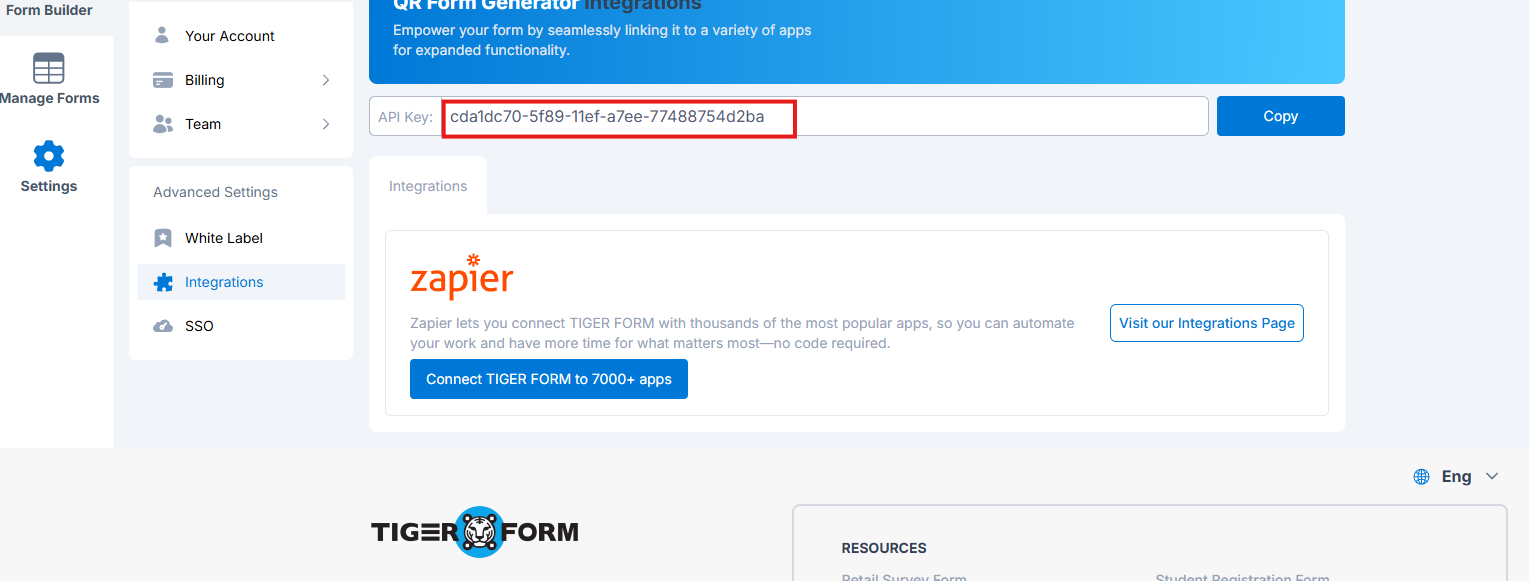
- Optional: import public.openapi.json or postman.collection.json into Postman or your HTTP client. Before production, skim Reliability — Before Go-Live Checklist and Typical Latency (
POST /formsoften 1–2s).
cURL examples (optional — E2E walkthrough has full copy-paste steps)
Example: list forms (cURL)
API_KEY="<API_KEY>"

curl -sS -X GET "https://api.form-qr-code-generator.com/v1/forms?page=1&limit=5" \
  -H "Authorization: Bearer ${API_KEY}" \
  -H "Accept: application/json"
Example: success response (HTTP 200)
{
  "status": "success",
  "data": {
    "total": 2,
    "page": 1,
    "pageSize": 5,
    "totalPages": 1,
    "items": [
      {
        "id": "507f1f77bcf86cd799439011",
        "qrId": "ABC123",
        "title": "Contact form",
        "shortText": "Contact us",
        "shortUrl": "https://tgr.li/ABC123",
        "scans": 120,
        "submissions": 45,
        "active": true,
        "createdAt": "2025-06-01T10:00:00.000Z",
        "updatedAt": "2025-06-15T08:30:00.000Z"
      }
    ]
  }
}
Empty account: same shape with total: 0, totalPages: 0, items: [].
Example: auth error (HTTP 401)
{
  "status": "failed",
  "message": "Not authorized",
  "code": 401,
  "data": {}
}
Validation and business-rule errors usually return HTTP 400 or 403 with the same status: failed shape. See Rate Limits & Retries for HTTP 429 and Core Concepts for when the API returns 400 vs 404.
Example: create a text submission
Full walkthrough: End-to-End Integration Step 3. Below reads the field key from submission-schema (requires jq) — do not hardcode keys from doc JSON examples.
API_KEY="<API_KEY>"
QR_ID=$(curl -sS "https://api.form-qr-code-generator.com/v1/forms?page=1&limit=1" \
  -H "Authorization: Bearer ${API_KEY}" \
  | jq -r '.data.items[0].qrId')

FIELD_KEY=$(curl -sS "https://api.form-qr-code-generator.com/v1/forms/${QR_ID}/submission-schema" \
  -H "Authorization: Bearer ${API_KEY}" \
  | jq -r '.data.fields | keys[0]')

curl -sS -X POST "https://api.form-qr-code-generator.com/v1/forms/${QR_ID}/submissions" \
  -H "Authorization: Bearer ${API_KEY}" \
  -H "Content-Type: application/json" \
  -H "Accept: application/json" \
  -H "Idempotency-Key: demo-abc123-001" \
  -d "$(jq -n --arg k "$FIELD_KEY" '{answers: {($k): "Jane Doe"}}')"
Working with file uploads or submission attachments? See Upload APIs Compared.
When a call fails
Check in this order — most issues are URL, key, or payload (not server bugs):
- Wrong path or method → HTTP 404 (Error Model · 5-minute checklist)
- Bad or missing API key → HTTP 401
- Wrong
qrId, role, or body → HTTP 400 / 403 (often not 404 for bad form id) - Quota exhausted → HTTP 429 (Rate Limits & Retries)
Pitfall list: Common Mistakes. Full step-by-step: Error Model → 5-Minute Troubleshooting Checklist. No free form slots on create → HTTP 400 — use an existing qrId from GET /forms or archive a test form in the web app.
Core Concepts
Read this once before integrating. It explains identifiers, list pagination, permissions, and error semantics used across the API.
On this page: Common Mistakes · Team Roles · Identifiers · Pagination · 400 vs 404
- Every call uses
Authorization: Bearer <API_KEY>. - Success JSON:
{ "status": "success", "data": … }. Errors:{ "status": "failed", "message", "code", "data": {} }. - Form id =
qrId(e.g.ABC123). Submission answers use fieldkeystrings fromsubmission-schema— not labels. - Wrong URL → 404. Bad key → 401. Valid route but wrong form or role → usually 400 or 403.
Common Mistakes
- Hardcoded field keys — always read live keys from
GET /forms/{qrId}/submission-schema(or the create-form response). Doc JSON uses<field-key>placeholders; cURL samples usejqto read keys at runtime. - Wrong analytics
period— use enum strings (month,year, …), not a day count.period=7returns HTTP 400. - Expecting 404 for bad
qrId— on valid routes, unknown or wrong-account forms usually return HTTP 400, not 404. See Error Model. - Exhausted monthly API quota — including Freemium's
500limit — returns HTTP 429. Upgrade, renew, or wait for the monthly reset before heavy integration testing. - API key in frontend code — call the API from your server only. Never expose the key in browser or mobile apps.
- Webhook signature on parsed JSON — verify HMAC against the raw request body bytes, not a re-serialized object. See Webhooks.
- Wrong upload endpoint — account logos use
POST /account/uploads; form branding and submission files usePOST /forms/{qrId}/uploadswith the rightcategory. See Upload APIs Compared. - Template internal field keys — raw
form.fieldson marketplace templates uses storage keys; useGET …/form-createor map tofields[]without keys onPOST /forms. See Form Templates API.
Base URL and responses
- Production base URL:
https://api.form-qr-code-generator.com/v1— append paths exactly as documented (/forms,/submissions/..., etc.). - JSON success:
{ "status": "success", "data": ... }. JSON errors:{ "status": "failed", "message", "code", "data": {} }. - Exception:
GET /forms/{qrId}/downloadreturns a binary image on success (not JSON). See Error Model.
Identifiers
| Name | Format | Where used |
|---|---|---|
qrId | Uppercase letters and digits (^[A-Z0-9]+$) | Form id in paths such as /forms/{qrId}, /forms/{qrId}/submissions, /forms/{qrId}/analytics |
shortUrl | https://tgr.li/{qrId} | Public link to open the form (scan target). Returned on GET /forms, GET /forms/{qrId}, and create/update responses — same qrId as in the path. |
submissionId | 24-character hex string | GET /submissions/{submissionId}, PUT /submissions/{submissionId}, DELETE /submissions/{submissionId}. Same value as data.submissionId on create and data.id on read. |
key | Server-assigned string (e.g. <field-key>) | Map key in answers on create, edit, and validate. Discover via GET /forms/{qrId}/submission-schema (recommended), GET /forms/{qrId}, or submission read/list responses. |
Field type | Public type string (e.g. shortText, checkbox) | On form read/create responses and submission-schema. Same type you send in POST /forms fields[]. Use valueType from submission-schema when building answers. |
fileId | Server file id | From POST /forms/{qrId}/uploads (category=submission); pass in answers only — server resolves fileUrl. |
Pagination (GET /forms, GET /forms/{qrId}/submissions)
Query params: page (default 1), limit (page size; submissions default 50, max 100). Response data includes:
items— forms for this pagetotal,page,pageSize,totalPages
Optional sort on forms: 1 newest first, 2 by name, 3 by scan count. On submissions, optional since / until filter by submission createdAt (ISO 8601 or Unix timestamp).
HTTP 400 vs 404
qrId, unknown form, archived form, or wrong account usually returns HTTP 400 with the standard JSON error envelope — not 404.When debugging, check the path first (404), then auth (401), then resource access (400). Full rules and upload exceptions: Error Model.
Exception — form file uploads: unknown or wrong-owner form → HTTP 404 on upload routes (not 400). See Upload APIs Compared for DELETE 400 on invalid qrId format.
Field list shape (array vs map)
GET /forms/{qrId} and create/update responses return fields as an array (each item includes key). GET /forms/{qrId}/submission-schema returns fields as an object keyed by field key — optimized for building answers. Do not assume the same JSON shape on every endpoint.
Team Roles
Most integrations use the account owner API key (full access). Team members have separate keys — permissions follow their role:
| Role | Can do | Cannot do (typical) |
|---|---|---|
| Owner | Everything on the account (forms, submissions, webhook, team if plan allows) | — |
| Admin | Same as owner for API purposes, including team member management | — |
| Editor | Create forms; create/edit submissions on forms they own | Edit another editor's form (400); team routes and account webhook (403); delete submissions (400) |
| Viewer | Read forms, submissions, analytics; create submissions | Create forms (403); edit forms or submissions (400); team routes and account webhook (403) |
POST /forms returns 403; Editor → POST /forms works but GET /account/webhook returns 403. See Authentication.Why 403 vs 400? 403 = this role cannot do that action at all (Viewer creating a form). 400 = route exists but this user cannot modify that specific resource (Viewer updating a form).
Per-route HTTP status tables and Team API endpoints: details below · Team API · API Reference → Team tag.
Viewer role — HTTP status by route
| Action | Typical status |
|---|---|
POST /forms (create form) | 403 |
PUT /forms/{qrId}, archive, restore, clone, share | 400 |
POST /forms/{qrId}/submissions (create submission) | 200 (allowed) |
PUT /submissions/{submissionId} | 400 |
DELETE /submissions/..., batch delete | 400 (Admin only for delete) |
GET /account/webhook, PUT /account/webhook | 403 (Owner/Admin only) |
GET /team/* (member management) | 403 |
Editor role — HTTP status by route
Editors may update only forms they created — editing another editor's form returns HTTP 400.
| Action | Typical status |
|---|---|
POST /forms, submissions create/edit on allowed forms | 200 (allowed) |
PUT /forms/{qrId} on a form created by another Editor | 400 |
GET /account/webhook, PUT /account/webhook | 403 (Owner/Admin only) |
GET /team/*, POST /team/members, member update/delete | 403 |
PUT /team/members/{memberId} | 403 (Editor or Viewer; Owner/Admin only) |
DELETE /submissions/..., batch delete | 400 (Admin only for delete) |
Write vs read (submissions)
Use the same answers map for create, edit, validate, and read. Read responses return answers only.
Typical integration flows
- Push a response — Create a Submission (
submission-schema→ optional validate → create with optionalIdempotency-Key). - Pull submissions — Read Submissions (
GET /forms/{qrId}/submissionswithsince/ pagination, orGET /submissions/{submissionId}for one record). - Push submissions (webhook) — configure one URL per account — Webhooks guide (
GET/PUT /account/webhook). - Programmatic form + QR — End-to-End Integration or Create a Form → optional
qrConfig→ download QR PNG. Optional layout helpers: AI Form Builder, Form Templates API. - Analytics —
GET /forms/{qrId}/analyticswithperiodand timezone. See Form Analytics.
End-to-End Integration
Five steps from zero to a working integration: create a form, send a response, read it back, download the QR image. Run from a terminal with bash and jq — or port the same flow to your language via SDK Examples.
API_KEY="<API_KEY>" once, then run each step. All curl examples use production: https://api.form-qr-code-generator.com/v1.QR_ID (from the web app or list API), then run Step 2 onward:API_KEY="<API_KEY>"
QR_ID=$(curl -sS "https://api.form-qr-code-generator.com/v1/forms?page=1&limit=1" \
-H "Authorization: Bearer ${API_KEY}" \
| jq -r '.data.items[0].qrId')
echo "Using qrId=${QR_ID}"Step 1 — Create a Form
Captures QR_ID and FIELD_KEY for later steps. If your plan has no free form slots (HTTP 400), use the shortcut above instead.
API_KEY="<API_KEY>"
CREATE_RESP=$(curl -sS -X POST "https://api.form-qr-code-generator.com/v1/forms" \
-H "Authorization: Bearer ${API_KEY}" \
-H "Content-Type: application/json" \
-d '{
"title": "API demo form",
"shortText": "Demo",
"fields": [
{ "type": "shortText", "option": { "label": "Name", "required": true } }
]
}')
QR_ID=$(echo "$CREATE_RESP" | jq -r '.data.qrId')
FIELD_KEY=$(echo "$CREATE_RESP" | jq -r '.data.fields[0].key')
echo "Created qrId=${QR_ID} fieldKey=${FIELD_KEY}"Example success response shape
{
"status": "success",
"data": {
"qrId": "ABC123",
"title": "API demo form",
"fields": [
{
"type": "shortText",
"key": "<assigned-on-create>",
"option": { "label": "Name", "required": true }
}
]
}
}Field type values: Form Field Types. Prefer natural language? Draft the layout with AI Form Builder, then pass data to POST /forms.
Step 2 — Discover answer shapes (optional)
Confirms valueType and example per field. Step 3 can reuse FIELD_KEY from Step 1; use this when integrating an existing form or many field types.
curl -sS "https://api.form-qr-code-generator.com/v1/forms/${QR_ID}/submission-schema" \
-H "Authorization: Bearer ${API_KEY}"Example response shape (keys are illustrative)
{
"status": "success",
"data": {
"qrId": "ABC123",
"title": "API demo form",
"fields": {
"<field-key>": {
"key": "<field-key>",
"type": "shortText",
"label": "Name",
"required": true,
"valueType": "string",
"example": "Example value"
}
}
}
}data.fields is a map keyed by field key (not an array). Refresh FIELD_KEY from schema if needed: FIELD_KEY=$(curl … submission-schema | jq -r '.data.fields | keys[0]').
Step 3 — Validate (optional) and create a submission
curl -sS -X POST "https://api.form-qr-code-generator.com/v1/forms/${QR_ID}/submissions/validate" \
-H "Authorization: Bearer ${API_KEY}" \
-H "Content-Type: application/json" \
-d "$(jq -n --arg k "$FIELD_KEY" '{answers: {($k): "Jane Doe"}}')"
CREATE_SUB_RESP=$(curl -sS -X POST "https://api.form-qr-code-generator.com/v1/forms/${QR_ID}/submissions" \
-H "Authorization: Bearer ${API_KEY}" \
-H "Content-Type: application/json" \
-H "Idempotency-Key: demo-abc123-001" \
-d "$(jq -n --arg k "$FIELD_KEY" '{answers: {($k): "Jane Doe"}}')")
SUBMISSION_ID=$(echo "$CREATE_SUB_RESP" | jq -r '.data.submissionId')
echo "submissionId=${SUBMISSION_ID}"Retry the same create call with the same Idempotency-Key + body to verify idempotency (no duplicate). See Create a Submission.
Step 4 — Read the submission back
curl -sS "https://api.form-qr-code-generator.com/v1/submissions/${SUBMISSION_ID}" \
-H "Authorization: Bearer ${API_KEY}"Success includes data.answers in the same shape as create/edit. See Read Submissions.
Step 5 — Download QR PNG
curl -sS -o qr.png "https://api.form-qr-code-generator.com/v1/forms/${QR_ID}/download?format=png&resolution=500" \
-H "Authorization: Bearer ${API_KEY}"Optional: set qrConfig on create/update before download — Create a Form, How to Customize Your QR Code, or pick a preset from Built-in QR Design Presets.
Next
- Before production — Before Go-Live Checklist in Reliability
- Pull new responses on a schedule —
GET /forms/{qrId}/submissions?since=... - File fields — upload workflow in Upload APIs Compared
- Errors and retries — Error Model, Rate Limits & Retries
Create a Form
Minimal walkthrough for POST /forms. The server assigns a new qrId and returns the full form including fields[].key for later submissions.
POST /form-ai-builder/generate). The response uses the same title, shortText, and fields (type + option) shape — review it, then call POST /forms below.Required body fields
title,shortText— display stringsfields— array of field definitions (each needstypeandoption). Do not sendkeyon create — the server assigns stable keys in the response. See Form Field Types for alltypevalues.
Send only the fields documented in this guide and the OpenAPI schemas — omit properties not listed there.
PUT /forms/{qrId} with a partial body — see Manage Forms. Do not send an existing qrId on POST /forms; that path exists for legacy web-designer compatibility only and is not supported for server integrations.backgroundType, logo, appearance, and backgroundImage may be accepted on POST /forms / PUT /forms/{qrId} but are not fully returned on GET /forms/{qrId}. Use the create/update response or the web designer preview for styling — do not rely on GET to restore those fields.Minimal example (one text field)
API_KEY="<API_KEY>"
curl -sS -X POST "https://api.form-qr-code-generator.com/v1/forms" \
-H "Authorization: Bearer ${API_KEY}" \
-H "Content-Type: application/json" \
-H "Accept: application/json" \
-d '{
"title": "Contact form",
"shortText": "Please fill out the form",
"fields": [
{ "type": "shortText", "option": { "label": "Name", "required": false } }
]
}'Success response (excerpt)
Example shape — save data.qrId and each fields[].key
{
"status": "success",
"data": {
"qrId": "ABC123",
"title": "Contact form",
"fields": [
{
"type": "shortText",
"key": "<assigned-on-create>",
"option": { "label": "Name", "required": false }
}
]
}
}data.qrId and each fields[].key. Use them in Create a Submission — field types via GET /forms/{qrId}/submission-schema (valueType per field).Optional: qrConfig (QR appearance)
Include a top-level qrConfig object on POST /forms and PUT /forms/{qrId} to style the downloadable QR image. All properties are optional — omitted keys use product defaults. Matches schema QRConfig in the sidebar. GET /forms/{qrId} and create/update responses return qrConfig as the same object shape.
| Property | Type | Notes |
|---|---|---|
colorDark | string (hex) | Main module color, e.g. "054080" or "#054080" |
eye_outer, eye_inner | enum | Finder pattern style — see eye_outer / eye_inner |
qrData | enum | Body dot pattern (pattern0 … pattern14) — qrData |
frame | integer 1–16 | Decorative frame around the code — frame |
frameText, frameTextFont | string | Caption under framed QR (e.g. "SCAN ME") |
gradient, color01, color02, grdType | bool / string | Body gradient — grdType |
logo | string (URL) | Center logo image URL — upload via POST /account/uploads (category=logo) first, then paste data.fileUrl |
transparentBkg | boolean | Transparent background on PNG download |
Full property list and previews: How to Customize Your QR Code, Built-in QR Design Presets, and OpenAPI schema QRConfig.
Example with qrConfig
API_KEY="<API_KEY>"
curl -sS -X POST "https://api.form-qr-code-generator.com/v1/forms" \
-H "Authorization: Bearer ${API_KEY}" \
-H "Content-Type: application/json" \
-d '{
"title": "Contact form",
"shortText": "Please fill out the form",
"fields": [
{ "type": "shortText", "option": { "label": "Name", "required": true } }
],
"qrConfig": {
"colorDark": "#054080",
"eye_outer": "eyeOuter2",
"eye_inner": "eyeInner1",
"qrData": "pattern0",
"frame": 1,
"frameText": "SCAN ME",
"gradient": false
}
}'After create, download the PNG with GET /forms/{qrId}/download?format=png&resolution=500 — see Manage Forms.
Next steps
- Customize QR appearance —
qrConfigon create/update, Built-in QR Design Presets, or How to Customize Your QR Code - Download QR image —
GET /forms/{qrId}/download?format=png&resolution=500(see End-to-End Integration Step 5) - Collect responses — Create a Submission
- Full schema —
FormCreatein API Reference → Schemas - Draft from a prompt — AI Form Builder
Form Field Types
Public field definitions use exactly two properties: type and option. On read responses the server also returns a stable key for each field (use it in submission answers).
{ "type": "shortText", "option": { ... } } on create/update. Responses echo the same type and option plus a server-assigned key.shortText, longText, multipleLevelSelect, checkList). Single-word types stay lowercase (email, radio, sheet).Supported type values
Jump to: shortText · checkbox · picture · checkList · sheet · answer shapes · schema-examples.json
type | Notes |
|---|---|
name | First / last name |
address | Address subfields |
phone | Phone number |
email | |
gender | Dropdown (options in option.options) |
shortText | Single-line text |
longText | Multi-line text |
number | Numeric input |
radio | Single choice — set option.options |
checkbox | Multiple choice — set option.options |
calendar | Date |
time | Time / datetime |
picture | Image upload (submission file workflow) |
document | Document upload |
signature | Signature capture |
audio | Audio upload |
video | Video upload |
title | Display-only title block |
description | Display-only description |
location | GPS / map location |
multipleLevelSelect | Cascade select — option tree in option.options; see API Reference for the full schema |
checkList | Checklist rows |
sheet | Table / sheet grid |
Minimal field object
{
"type": "shortText",
"option": {
"label": "Your name",
"required": true,
"hint": "Optional hint text"
}
}Choice fields (radio, checkbox, gender) need option.options — see API Reference schemas for radio and checkbox. Full property lists: API Reference → Schemas → Field. From a marketplace template? Use GET /form-templates/{templateId}/form-create — see Form Templates API.
Create a Submission
Push a form response from your integration server with POST /forms/{qrId}/submissions. Requires Authorization: Bearer <API_KEY> — server-to-server only; do not call from browser or mobile app code.
On this page: answers shape · Text workflow · File workflow · Success response · Common errors
GET /forms/{qrId}/submission-schema— read each fieldkeyandvalueType.- Optional:
POST …/submissions/validate— sameanswersbody, no row created. POST …/submissions— send{ "answers": { "<key>": <value> } }; addIdempotency-Keyfor safe retries.
qrId you own. Do not copy placeholder keys from docs — use keys from submission-schema. Field value shapes: Submission Field Reference.Simplified payload — answers
Send a flat map of field key → simple value. File fields need only fileId after upload.
{
"answers": {
"<field-key>": "Jane Doe",
"<checkbox-field-key>": ["Option 1"],
"<file-field-key>": { "fileId": "507f1f77bcf86cd799439011" }
}
}Workflow — text fields
GET /forms/{qrId}/submission-schema— read each fieldkey,valueType, andexample.POST /forms/{qrId}/submissions/validate— optional dry-run with{ "answers": { ... } }.POST /forms/{qrId}/submissions— same body; optional headerIdempotency-Keyfor safe retries.
Example submission-schema response (keys are illustrative)
{
"status": "success",
"data": {
"qrId": "ABC123",
"title": "Contact form",
"fields": {
"<name-field-key>": {
"key": "<name-field-key>",
"type": "shortText",
"label": "Name",
"required": false,
"valueType": "string",
"example": "Example value"
},
"<interests-field-key>": {
"key": "<interests-field-key>",
"type": "checkbox",
"label": "Interests",
"required": false,
"options": [{ "value": "Option 1", "name": "Option 1" }],
"valueType": "string[]",
"example": ["Option 1"]
},
"<photo-field-key>": {
"key": "<photo-field-key>",
"type": "picture",
"label": "Photo",
"required": false,
"valueType": "fileId[]",
"example": { "fileId": "<from POST /forms/{qrId}/uploads>" }
}
}
}
}Assumes API_KEY and QR_ID are set — see Manage Forms → cURL setup (or End-to-End Integration Step 1).
FIELD_KEY=$(curl -sS "https://api.form-qr-code-generator.com/v1/forms/${QR_ID}/submission-schema" \
-H "Authorization: Bearer ${API_KEY}" \
| jq -r '.data.fields | keys[0]')
curl -sS -X POST "https://api.form-qr-code-generator.com/v1/forms/${QR_ID}/submissions" \
-H "Authorization: Bearer ${API_KEY}" \
-H "Content-Type: application/json" \
-H "Idempotency-Key: demo-abc123-001" \
-d "$(jq -n --arg k "$FIELD_KEY" '{answers: {($k): "Jane Doe"}}')"Workflow — file fields
POST /forms/{qrId}/uploads—category=submission, one request per file.- Copy
data.fileIdfrom the upload response intoanswers(server resolvesfileUrl). POST /forms/{qrId}/submissionswith the fullanswersmap.
Upload limits and curl: Upload APIs Compared.
Success response
All forms — HTTP 200 with the standard success envelope. Non-quiz:
{ "status": "success", "data": { "submissionId": "507f1f77bcf86cd799439011" } }Quiz Forms add score fields in the same data object (uses points, matching quizData.points on read). Visibility depends on form quizConfig:
- When
showFinalScoreis false — omitpoints,totalMarks,percentage, and per-questionpoints/earnedPoints. - When
showAnswersResultsis false — omitcorrectAnsweron eachquizResultitem.
{
"status": "success",
"data": {
"submissionId": "507f1f77bcf86cd799439011",
"points": 80,
"totalMarks": 100,
"percentage": 80,
"passed": true,
"passingScore": 70,
"quizResult": [ { "question": "Question 1", "correct": true, "answer": "Yes" } ]
}
}Quiz and validate (optional)
Quiz Forms, timed quizzes, and validate dry-run
Quiz-only body fields
On timed quizzes, include alongside answers:
{
"answers": { "<field-key>": "Yes" },
"timeSpentSeconds": 95,
"timeExpired": false
}Validate before create
POST /forms/{qrId}/submissions/validateSame JSON body as create. Success: { "status": "success", "data": { "valid": true } }. Failure: HTTP 400 with data.fieldErrors keyed by field key — see Error Model.
Common errors
- 401 — missing or invalid API key.
- 400 — unknown
qrId, wrong account, plan limit, or invalidanswers(data.fieldErrorslists each field problem). - 409 — same
Idempotency-Keyreused with a different JSON body. - 429 — submission file upload rate limit (upload step only).
Related
- Read Submissions —
quizDataon list/get when the form is a quiz - Webhooks —
submission.quizDatain push payloads - Optional: Quiz Forms (API authoring)
- OpenAPI —
POST /forms/{qrId}/submissions, schemaSubmissionCreateBody
Quiz Forms (optional)
isQuiz, quizConfig).If a quiz was built in the web app, you do not need this guide — handle submissions like any other form. See Create a Submission (quiz response shape), Read Submissions (quizData), and Webhooks.
When to use the API
- Automated provisioning of assessment forms (LMS, training portals).
- Syncing quiz definitions from an external content system.
Authoring via POST /forms
Send isQuiz: true, form-level quizConfig (e.g. passingScore, showFinalScore), and question fields with option.disableQuiz: false plus per-field quizConfig (points, correctAnswers). Scored field types: radio, checkbox, shortText, number. Requires plan quiz features — HTTP 400 if a setting is not allowed.
GET /forms/{qrId} returns isQuiz and form-level quizConfig but not per-field correct answers.
Minimal create example
cURL — create quiz via POST /forms
API_KEY="<API_KEY>"
curl -sS -X POST "https://api.form-qr-code-generator.com/v1/forms" \
-H "Authorization: Bearer ${API_KEY}" \
-H "Content-Type: application/json" \
-d '{
"title": "Safety quiz",
"shortText": "Answer all questions",
"isQuiz": true,
"quizConfig": { "passingScore": 70, "showFinalScore": true },
"fields": [{
"type": "radio",
"option": {
"label": "Question 1",
"disableQuiz": false,
"options": [
{ "name": "Yes", "value": "Yes", "key": 1 },
{ "name": "No", "value": "No", "key": 2 }
]
},
"quizConfig": { "points": 100, "correctAnswers": "Yes" }
}]
}'Plan-gated quiz settings
On POST /forms and PUT /forms/{qrId}, the server validates quizConfig and per-field quizConfig against your plan. Disallowed settings return HTTP 400 with the standard error envelope (Error Model), for example:
{
"status": "failed",
"message": "Quiz time limit is not allowed on your plan",
"code": 400,
"data": {}
}| Setting | Starter / Freemium | Business and above |
|---|---|---|
quizConfig.enableTimeLimit | Not allowed | Allowed |
quizConfig.timeLimit (non-default) | Fixed 30 min when time limit is enabled | Custom duration (seconds) |
quizConfig.shuffleQuestions | Not allowed | Allowed |
quizConfig.distributeMarksEvenly | Not allowed | Allowed |
quizConfig.passingScore ≠ 70 | Default 70 only | Custom passing score |
quizConfig.passMessage / failMessage / timeUpMessage | Varies by plan | Usually allowed |
Multiple correctAnswers on shortText or number | Often limited to one value | Higher limits or unlimited |
Exact limits depend on your active plan. Upgrade in the web app if a setting is rejected.
Related (core path)
- Create a Submission — same
answersmap; quiz returnspointsand related fields indata - Read Submissions —
quizDataon each item - OpenAPI —
FormCreate,SubmissionCreateQuizData,POST /forms
Manage Submissions
Update or delete responses. To list or map payload fields, see Read Submissions. To create, see Create a Submission.
On this page: Actions table · cURL examples (list, get, update, delete, batch delete)
| Action | Endpoint | Notes |
|---|---|---|
| Update answers | PUT /submissions/{submissionId} | Same answers shape as create. Viewer → 400 |
| Delete one | DELETE /submissions/{submissionId} | Admin only |
| Delete many | POST /forms/{qrId}/submissions/batch-delete | Body { "submissionIds": [...] }. Admin only |
cURL examples (list, get, update, delete)
Set API_KEY and QR_ID — Manage Forms → cURL setup.
List submissions
GET /forms/{qrId}/submissions?page=1&limit=50Success shape: { "status": "success", "data": { "total", "page", "pageSize", "totalPages", "items": [ /* submissions */ ] }, "form": { ... } }. HTTP 200 with data.items: [] and data.total: 0 means the form exists but has no matching responses.
Optional time filters: since and until on submission createdAt (ISO 8601 or Unix timestamp). Results are sorted newest first.
curl -sS "https://api.form-qr-code-generator.com/v1/forms/${QR_ID}/submissions?page=1&limit=50&since=2025-01-01T00:00:00Z" \
-H "Authorization: Bearer ${API_KEY}" \
-H "Accept: application/json"Example response — see full JSON in Read Submissions (GET /forms/{qrId}/submissions).
Get one submission
GET /submissions/{submissionId}Use when you already have the submission id (24-character hex string from create, list, or your database). Response shape and field mapping: Read Submissions. Unknown id or wrong account returns HTTP 400.
SUBMISSION_ID=$(curl -sS "https://api.form-qr-code-generator.com/v1/forms/${QR_ID}/submissions?page=1&limit=1" \
-H "Authorization: Bearer ${API_KEY}" \
| jq -r '.data.items[0].id')
curl -sS "https://api.form-qr-code-generator.com/v1/submissions/${SUBMISSION_ID}" \
-H "Authorization: Bearer ${API_KEY}" \
-H "Accept: application/json"Update a submission
PUT /submissions/{submissionId} — send updated answers (same shape as create). Accounts with the Viewer role cannot edit (HTTP 400).
SUBMISSION_ID=$(curl -sS "https://api.form-qr-code-generator.com/v1/forms/${QR_ID}/submissions?page=1&limit=1" \
-H "Authorization: Bearer ${API_KEY}" \
| jq -r '.data.items[0].id')
FIELD_KEY=$(curl -sS "https://api.form-qr-code-generator.com/v1/forms/${QR_ID}/submission-schema" \
-H "Authorization: Bearer ${API_KEY}" \
| jq -r '.data.fields | keys[0]')
curl -sS -X PUT "https://api.form-qr-code-generator.com/v1/submissions/${SUBMISSION_ID}" \
-H "Authorization: Bearer ${API_KEY}" \
-H "Content-Type: application/json" \
-d "$(jq -n --arg k "$FIELD_KEY" '{answers: {($k): "Updated name"}}')"Delete submissions
Admin role only — Editor and Viewer accounts receive HTTP 400.
- One —
DELETE /submissions/{submissionId} - Many —
POST /forms/{qrId}/submissions/batch-deletewith body{ "submissionIds": ["...", "..."] }(form id in path)
Reuse SUBMISSION_ID from create/list above, or resolve the newest row:
SUBMISSION_ID=$(curl -sS "https://api.form-qr-code-generator.com/v1/forms/${QR_ID}/submissions?page=1&limit=1" \
-H "Authorization: Bearer ${API_KEY}" \
| jq -r '.data.items[0].id')curl -sS -X DELETE "https://api.form-qr-code-generator.com/v1/submissions/${SUBMISSION_ID}" \
-H "Authorization: Bearer ${API_KEY}" \
-H "Accept: application/json"Batch delete — pass one or more ids in submissionIds:
curl -sS -X POST "https://api.form-qr-code-generator.com/v1/forms/${QR_ID}/submissions/batch-delete" \
-H "Authorization: Bearer ${API_KEY}" \
-H "Content-Type: application/json" \
-d "$(jq -n --arg id "$SUBMISSION_ID" '{submissionIds: [$id]}')"Read Submissions
Pull form responses into your system. Edit or delete: Manage Submissions. Real-time push: Webhooks.
| Your goal | Endpoint |
|---|---|
| List responses (paginated) | GET /forms/{qrId}/submissions?page=1&limit=50 |
| Poll only new responses | Same + since=2025-06-01T00:00:00Z (ISO or Unix timestamp) |
| Fetch one response by id | GET /submissions/{submissionId} |
data.answers — same shape as create/edit. File fields on read may include fileUrl. Labels: match form.fields[] by key. Create returns data.submissionId; list/read use id for the same value.On this page: Response examples · Map payload · Incremental pull
Response examples
List, get one, and quiz quizData samples
Example — GET /forms/{qrId}/submissions
{
"status": "success",
"data": {
"total": 1,
"page": 1,
"pageSize": 50,
"totalPages": 1,
"items": [
{
"id": "507f1f77bcf86cd799439011",
"qrId": "ABC123",
"createdAt": "2025-06-01T10:00:00.000Z",
"answers": {
"<name-field-key>": "Jane Doe",
"<interests-field-key>": ["Option 1", "Option 2"],
"<photo-field-key>": {
"fileId": "507f1f77bcf86cd799439011",
"fileUrl": "https://cdn.example.com/files/abc.png"
}
}
}
]
},
"form": {
"title": "Contact form",
"fields": [
{ "key": "<name-field-key>", "type": "shortText", "option": { "label": "Name" } },
{ "key": "<interests-field-key>", "type": "checkbox", "option": { "label": "Interests" } },
{ "key": "<photo-field-key>", "type": "picture", "option": { "label": "Photo" } }
]
}
}No responses yet: HTTP 200 with data.total: 0, data.items: [], and the same form block.
Example — GET /submissions/{submissionId}
{
"status": "success",
"data": {
"id": "507f1f77bcf86cd799439011",
"qrId": "ABC123",
"createdAt": "2025-06-01T10:00:00.000Z",
"answers": {
"<name-field-key>": "Jane Doe",
"<interests-field-key>": ["Option 1", "Option 2"],
"<photo-field-key>": {
"fileId": "507f1f77bcf86cd799439011",
"fileUrl": "https://cdn.example.com/files/abc.png"
}
}
},
"form": {
"title": "Contact form",
"fields": [
{ "key": "<name-field-key>", "type": "shortText", "option": { "label": "Name" } },
{ "key": "<interests-field-key>", "type": "checkbox", "option": { "label": "Interests" } },
{ "key": "<photo-field-key>", "type": "picture", "option": { "label": "Photo" } }
]
}
}Each key in answers maps to one entry in form.fields (match on key).
Quiz item excerpt
{
"id": "507f1f77bcf86cd799439011",
"qrId": "QUIZ01",
"answers": { "<field-key>": "Yes" },
"quizData": {
"points": 100,
"totalMarks": 100,
"percentage": 100,
"passed": true,
"passingScore": 70
}
}Field keys and file URLs in examples are illustrative — use live values from your form.
Map read payload → your integration
| What you need | Where to read it |
|---|---|
| Submission id | data.id on read (same value as create data.submissionId) |
| Form id | data.qrId |
| Submitted at | data.createdAt |
| Answer values | data.answers[fieldKey] — same types as create/edit; file fields may include fileUrl on read |
| Quiz score on create | data.points, data.totalMarks, data.percentage, data.passed, … — see Create a Submission |
| Quiz score on read | data.quizData — points, totalMarks, percentage, passed, etc. Check form.isQuiz or GET /forms/{qrId} |
| Field label | form.fields[] → match key → option.label |
| Field type | form.fields[] → type, or GET /forms/{qrId}/submission-schema |
Quiz Forms also return quizData on each item — see samples in Response examples above and Quiz Forms (optional).
Incremental pull
Assumes API_KEY and QR_ID are set (see Manage Forms → cURL setup).
curl -sS "https://api.form-qr-code-generator.com/v1/forms/${QR_ID}/submissions?page=1&limit=50&since=2025-06-01T00:00:00Z" \
-H "Authorization: Bearer ${API_KEY}" \
-H "Accept: application/json"Store the latest createdAt (or submission id) in your system and pass since on the next poll. Alternatively, configure an account-level webhook — see Webhooks.
Manage Forms
Read, update, archive, clone, share, and delete forms after creation.
On this page: Goals table · cURL setup (API_KEY + QR_ID) · list · update · delete · share · download
- Create a new form →
POST /forms - Update an existing form →
PUT /forms/{qrId}(partial body). Do not rely on sendingqrIdinPOST /forms— that is legacy web-designer behavior. - Read field keys →
GET /forms/{qrId}(page styling may be missing on GET — see Create a Form)
Viewer role: cannot create (403 on POST /forms) or update (400 on writes). Role details: Core Concepts.
| Goal | Method & path |
|---|---|
| List forms (paginated) | GET /forms?page=1&limit=5 (default limit is 5) |
| Get one form + field keys | GET /forms/{qrId} |
| Update form | PUT /forms/{qrId} — partial body, same fields as create |
| Archive / restore | PUT /forms/{qrId}/archive, PUT /forms/{qrId}/restore |
| Delete one / many | DELETE /forms/{qrId}, DELETE /forms?ids=... |
| Clone copies | POST /forms/{qrId}/clone |
| Download QR image | GET /forms/{qrId}/download?format=png&resolution=500 — binary response; format required (png, svg, pdf, eps) |
| Email share link | POST /forms/{qrId}/share — recipient emails in body |
| Analytics / scans | GET /forms/{qrId}/analytics — see Form Analytics |
cURL examples (list, update, delete, share, download)
Set once — reuse ${QR_ID} in every path below (from End-to-End Integration Step 1 or list API):
API_KEY="<API_KEY>"
QR_ID=$(curl -sS "https://api.form-qr-code-generator.com/v1/forms?page=1&limit=1" \
  -H "Authorization: Bearer ${API_KEY}" \
  | jq -r '.data.items[0].qrId')
echo "Using qrId=${QR_ID}"Example: list forms
curl -sS "https://api.form-qr-code-generator.com/v1/forms?page=1&limit=5&sort=1" \
-H "Authorization: Bearer ${API_KEY}" \
-H "Accept: application/json"{
"status": "success",
"data": {
"total": 2,
"page": 1,
"pageSize": 5,
"totalPages": 1,
"items": [
{
"qrId": "ABC123",
"title": "Contact form",
"shortText": "Contact us",
"scans": 120,
"submissions": 45,
"active": true,
"createdAt": "2025-06-01T10:00:00.000Z"
}
]
}
}Pagination fields: data.total, data.page, data.pageSize, data.totalPages. See Core Concepts.
Example: update form title
curl -sS -X PUT "https://api.form-qr-code-generator.com/v1/forms/${QR_ID}" \
-H "Authorization: Bearer ${API_KEY}" \
-H "Content-Type: application/json" \
-d '{"title":"Updated title","submissionNotification":false}'Set submissionNotification: false to stop instant email alerts for new submissions on this form.
Example: delete multiple forms
Repeat ids once per qrId (not comma-separated). Example deletes the listed form plus one other — replace OTHER_QR_ID or omit the second ids param.
OTHER_QR_ID="DEF456"
curl -sS -X DELETE "https://api.form-qr-code-generator.com/v1/forms?ids=${QR_ID}&ids=${OTHER_QR_ID}" \
-H "Authorization: Bearer ${API_KEY}" \
-H "Accept: application/json"Accounts with the Viewer role cannot delete forms.
Example: share form by email
curl -sS -X POST "https://api.form-qr-code-generator.com/v1/forms/${QR_ID}/share" \
-H "Authorization: Bearer ${API_KEY}" \
-H "Content-Type: application/json" \
-d '{ "recipients": "colleague@example.com,partner@example.com" }'recipients is a comma-separated string (max 5 addresses), not a JSON array.
Example: download QR image
curl -sS -o qr.png "https://api.form-qr-code-generator.com/v1/forms/${QR_ID}/download?format=png&resolution=500" \
-H "Authorization: Bearer ${API_KEY}"Success returns raw image bytes (not JSON). Customize appearance via qrConfig — How to Customize Your QR Code.
Team API
Manage team members under your account. Role summary: Core Concepts.
POST /team/members returns HTTP 400 on ineligible plans. Team member slot limits apply per plan.| Action | Endpoint | Who can call |
|---|---|---|
| List members | GET /team/members | Owner or Admin |
| Create member | POST /team/members | Owner or Admin |
| Update member | PUT /team/members/{memberId} | Owner or Admin |
| Delete member | DELETE /team/members/{memberId} | Owner or Admin |
| Change password | POST /team/members/{memberId}/reset-password | The member changing their own password (oldPass, newPass, confirmPass) |
| Rename team | PATCH /team | Owner or Admin |
Editor and Viewer accounts receive HTTP 403 on list, create, delete, and rename routes above. PUT /team/members/{memberId} also returns 403 for Editor and Viewer accounts.
cURL examples (list, create, rename, reset password)
Set once — owner or Admin key unless noted:
API_KEY="<API_KEY>"Example: list members
curl -sS "https://api.form-qr-code-generator.com/v1/team/members" \
  -H "Authorization: Bearer ${API_KEY}" \
  -H "Accept: application/json"
Example: create an Editor
curl -sS -X POST "https://api.form-qr-code-generator.com/v1/team/members" \
  -H "Authorization: Bearer ${API_KEY}" \
  -H "Content-Type: application/json" \
  -d '{
    "name": "Integration Bot",
    "email": "bot@example.com",
    "password": "SecurePass123!",
    "userType": "Editor"
  }'
userType is typically Admin, Editor, or Viewer. Plan limits and duplicate emails return HTTP 400.
Example: rename team
curl -sS -X PATCH "https://api.form-qr-code-generator.com/v1/team" \
  -H "Authorization: Bearer ${API_KEY}" \
  -H "Content-Type: application/json" \
  -d '{
    "teamName": "Acme Integrations",
    "password": "YourAccountPassword"
  }'
password is the authenticated account's current login password (Owner or Admin), not the new team name.
Example: change a member password
The team member whose password is changing calls this route with their current and new password. Owner and Admin cannot reset another member's password through this endpoint.
curl -sS -X POST "https://api.form-qr-code-generator.com/v1/team/members/674a…/reset-password" \
  -H "Authorization: Bearer <MEMBER_API_KEY>" \
  -H "Content-Type: application/json" \
  -d '{
    "oldPass": "OldPass123!",
    "newPass": "NewSecurePass456!",
    "confirmPass": "NewSecurePass456!"
  }'
Team API responses
All Team endpoints return the standard envelope. Create and update include a member object. List returns data.members[] with the same fields (id, name, email, userType, blocked) — never passwords or API keys.
{
  "status": "success",
  "data": {
    "message": "Team member created.",
    "member": {
      "id": "674a…",
      "name": "Integration Bot",
      "email": "bot@example.com",
      "userType": "Editor",
      "blocked": false
    }
  }
}
Update member returns the same member shape. Delete returns { "message": "…" } only. Change password returns { "message": "Password updated." }. Rename team returns { "message": "…", "teamName": "…" }.
Account API
Account-level logo uploads for QR branding. For push notifications on new submissions, see the dedicated Webhooks guide. Not for form page assets or submission files — use Upload APIs Compared for those.
| Endpoint | Purpose | Who can call |
|---|---|---|
GET /account/uploads | List logos uploaded for your account | Any authenticated key (active plan) |
POST /account/uploads | Upload a new logo (category=logo) | Any authenticated key (active plan) |
Webhook configuration (GET/PUT /account/webhook) is documented in Webhooks.
cURL — upload and list logos
Set once:
API_KEY="<API_KEY>"Upload a logo
Images only (JPEG, PNG, SVG, etc.), max 20 MB. Multipart part name: userFile. Oversize files may return HTTP 500 (uploaded file is too large).
curl -sS -X POST "https://api.form-qr-code-generator.com/v1/account/uploads" \
  -H "Authorization: Bearer ${API_KEY}" \
  -H "Accept: application/json" \
  -F "userFile=@logo.png;type=image/png" \
  -F "category=logo"
Use the logo on a form
Copy data.fileId and data.fileUrl from the upload response into logo or qrConfig.logo when calling Create a Form or Manage Forms (PUT /forms/{qrId}).
List uploaded logos
curl -sS "https://api.form-qr-code-generator.com/v1/account/uploads" \
  -H "Authorization: Bearer ${API_KEY}" \
  -H "Accept: application/json"
Webhooks
Receive a signed HTTP POST to your server whenever a new submission is created on any form owned by your account. One webhook URL per account — filter by qrId in your handler. Configure via API or the Integrations page in the web app (same place as your API key).
On this page: Setup (curl) · Signing secret · Delivery · Payload · Verify signature
- Expose a public HTTPS endpoint (use a tunnel such as ngrok if your receiver runs on your machine).
PUT /account/webhookwith{ "enabled": true, "url": "https://…" }.GET /account/webhook— savedata.secretserver-side.- Verify
X-TigerForm-Signatureon each POST (raw body HMAC). - Respond 2xx within 10s; use polling as backup — no automatic retries.
GET/PUT /account/webhook. Editor and Viewer receive HTTP 403. All forms on the account share the owner's webhook settings.Setup (curl) — enable webhook and read secret
API_KEY="<API_KEY>"

curl -sS -X PUT "https://api.form-qr-code-generator.com/v1/account/webhook" \
  -H "Authorization: Bearer ${API_KEY}" \
  -H "Content-Type: application/json" \
  -d '{"enabled": true, "url": "https://hooks.example.com/tigerform"}'

curl -sS "https://api.form-qr-code-generator.com/v1/account/webhook" \
  -H "Authorization: Bearer ${API_KEY}"
Success: { "status": "success", "data": { "enabled": true, "url": "…", "secret": "…" } }. The server generates secret when a URL is first saved. Disable with { "enabled": false, "url": "" } (clears secret).
Signing secret lifecycle
- First save —
PUTwith a non-emptyurlgeneratessecretif none exists. - Change URL only —
secretstays the same (update your handler config only if the URL changes). - Disable —
{ "enabled": false, "url": "" }clearsurlandsecret. - Rotate after compromise —
PUTwith{ "enabled": true, "url": "https://…", "rotateSecret": true }(same URL is fine) to receive a newsecretin the response. Update your server before relying on the new value.
Delivery
On each new submission, TIGER FORM POSTs JSON to your URL:
- Timeout: 10 seconds — respond with HTTP 2xx promptly.
- Retries: TIGER FORM does not automatically retry failed deliveries. Use polling as a backup if your endpoint was unavailable.
- Recommended pattern: Verify signatures, handle duplicates idempotently (by
submissionId), and use polling (GET /forms/{qrId}/submissions?since=…) as a backup — especially after outages or if your endpoint was down. - User-Agent:
TigerForm-Webhook/1.0
Request headers
| Header | Value |
|---|---|
Content-Type | application/json |
X-TigerForm-Event | submission.created |
X-TigerForm-Delivery-Id | Unique id per delivery attempt |
X-TigerForm-Signature | sha256= + HMAC-SHA256 of the raw request body using secret |
Payload (submission.created)
Schema: WebhookSubmissionCreatedEvent in the sidebar. TIGER FORM sends HTTP POST with Content-Type: application/json and the JSON body below (sign the exact raw bytes for verification).
Payload examples — shape only; answers keys match your form
Regular form (no quiz)
{
  "event": "submission.created",
  "qrId": "ABC123",
  "formTitle": "Contact form",
  "submission": {
    "id": "507f1f77bcf86cd799439011",
    "createdAt": "2026-06-01T12:00:00.000Z",
    "updatedAt": "2026-06-01T12:00:00.000Z",
    "answers": {
      "<name-field-key>": "Jane Doe",
      "<interests-field-key>": ["Option 1"],
      "<photo-field-key>": { "fileId": "507f1f77bcf86cd799439012" }
    }
  }
}
Quiz form (quizData included)
{
  "event": "submission.created",
  "qrId": "QUIZ01",
  "formTitle": "Safety quiz",
  "submission": {
    "id": "507f1f77bcf86cd799439011",
    "createdAt": "2026-06-01T12:00:00.000Z",
    "updatedAt": "2026-06-01T12:00:00.000Z",
    "answers": {
      "<question-1-key>": "Yes",
      "<question-2-key>": "B"
    },
    "quizData": {
      "points": 80,
      "totalMarks": 100,
      "percentage": 80,
      "passed": true,
      "passingScore": 70,
      "quizResult": [
        { "question": "Is PPE required?", "answer": "Yes", "correct": true, "points": 50, "earnedPoints": 50, "correctAnswer": "Yes" },
        { "question": "Max speed?", "answer": "B", "correct": false, "points": 50, "earnedPoints": 0, "correctAnswer": "A" }
      ]
    }
  }
}
answers uses the same simplified map as Create a Submission. quizData is omitted on non-quiz forms. Unlike create responses, webhook quizData includes the complete quiz result — not filtered by showFinalScore or showAnswersResults.
Test handler locally + verify signature (Node & Python)
Simulate inbound POST
Use this to test your handler before going live. Replace X-TigerForm-Signature with a valid HMAC of the body using your webhook secret (or skip verification in dev only).
curl -sS -X POST "https://hooks.example.com/tigerform" \
  -H "Content-Type: application/json" \
  -H "User-Agent: TigerForm-Webhook/1.0" \
  -H "X-TigerForm-Event: submission.created" \
  -H "X-TigerForm-Delivery-Id: test-delivery-001" \
  -H "X-TigerForm-Signature: sha256=<computed-hmac-of-raw-body>" \
  -d '{
    "event": "submission.created",
    "qrId": "ABC123",
    "formTitle": "Contact form",
    "submission": {
      "id": "507f1f77bcf86cd799439011",
      "createdAt": "2026-06-01T12:00:00.000Z",
      "updatedAt": "2026-06-01T12:00:00.000Z",
      "answers": { "<name-field-key>": "Jane Doe" }
    }
  }'
Verify signature (Node.js)
Use the raw request body bytes (before JSON re-serialization). With Express, prefer express.raw({ type: 'application/json' }) on the webhook route.
const crypto = require('crypto');

function verifyTigerFormWebhook(rawBody, signatureHeader, secret) {
  const expected = 'sha256=' + crypto.createHmac('sha256', secret).update(rawBody, 'utf8').digest('hex');
  const received = signatureHeader || '';
  if (expected.length !== received.length) return false;
  return crypto.timingSafeEqual(Buffer.from(expected), Buffer.from(received));
}
Verify signature (Python)
Use the raw request body bytes Flask/Django receive — not a re-serialized dict.
import hmac
import hashlib

def verify_tigerform_webhook(raw_body: bytes, signature_header: str, secret: str) -> bool:
    expected = "sha256=" + hmac.new(
        secret.encode("utf-8"), raw_body, hashlib.sha256
    ).hexdigest()
    received = signature_header or ""
    if len(expected) != len(received):
        return False
    return hmac.compare_digest(expected, received)
Related
- Read Submissions — polling fallback with
since;quizDataon quiz forms - Reliability — idempotency and operational notes
- OpenAPI — Account tag,
GET/PUT /account/webhook, schemaAccountWebhook
Form Templates API
Browse public templates in the marketplace, manage favorites, share by email, or save private templates on your account. Categories are listed under Form Template Categories. API requests create private templates only — the public gallery is managed by TIGER FORM.
Create a Form from a template
GET /form-templates/categories— list categories (getidfor each category). Optional?items=1embeds up to six public templates per root category.GET /form-templates?categoryId=...&limit=10— list public templates in a category; saveidfrom a row.GET /form-templates/{templateId}/form-create— returns aPOST /formsbody (title,shortText,fields[]).POST /forms— send thedataobject from step 3 (see Create a Form).
templateId format. Use the 24-character hex id from list responses (step 2). URL slugs such as contact-form-basic are not accepted — the API returns HTTP 400 with Invalid template id.Example — form-create curl and response
API_KEY="<API_KEY>"

curl -sS "https://api.form-qr-code-generator.com/v1/form-templates/TEMPLATE_ID/form-create" \
  -H "Authorization: Bearer ${API_KEY}" \
  -H "Accept: application/json"
{
"status": "success",
"data": {
"title": "Contact form",
"shortText": "Get in touch",
"fields": [
{ "type": "shortText", "option": { "label": "Name", "required": true } },
{ "type": "email", "option": { "label": "Email", "required": true } }
]
}
}data.fields from form-create, remove fields you do not need, then pass the edited body to POST /forms.Pass data to POST /forms as-is (after review). Optional fields such as qrConfig or quiz settings are included when present on the template. Cannot call form-create? See Manual convert (fallback). Use GET /form-templates/{templateId} when you need full template metadata (SEO fields, preview image, raw form object).
Other template endpoints
| Method | Path | Summary |
|---|---|---|
| GET | /form-templates/categories | List template categories |
| GET | /form-templates | List public templates in a category (categoryId required) |
| GET | /form-templates/{templateId} | Get one template by id (full metadata + raw form) |
| GET | /form-templates/{templateId}/form-create | Convert template to POST /forms body |
| GET | /form-templates/favorites | List your favorite templates |
| GET | /form-templates/mine | List private templates you created on this account |
| PUT | /form-templates/{templateId}/favorite | Add template to favorites |
| DELETE | /form-templates/{templateId}/favorite | Remove template from favorites |
| POST | /form-templates/{templateId}/share | Email a public template link (recipients in body) |
| POST | /form-templates | Save a private template on your account (categoryId, title, form). Not published to the public gallery. |
More examples (browse categories, favorites, save private, share)
Set once: API_KEY="<API_KEY>"
Example: list categories
curl -sS "https://api.form-qr-code-generator.com/v1/form-templates/categories" \
  -H "Authorization: Bearer ${API_KEY}" \
  -H "Accept: application/json"
{
"status": "success",
"data": [
{ "id": "507f1f77bcf86cd799439012", "name": "Business" }
]
}Category ids use id (24-character hex string).
Example: list templates in a category
curl -sS "https://api.form-qr-code-generator.com/v1/form-templates?categoryId=CATEGORY_ID&limit=10" \
  -H "Authorization: Bearer ${API_KEY}" \
  -H "Accept: application/json"
{
"status": "success",
"data": [
{
"id": "507f1f77bcf86cd799439013",
"title": "Contact form basic",
"categoryName": "Business"
}
]
}Example: get template by id
curl -sS "https://api.form-qr-code-generator.com/v1/form-templates/507f1f77bcf86cd799439013" \
  -H "Authorization: Bearer ${API_KEY}" \
  -H "Accept: application/json"
Example: add to favorites
curl -sS -X PUT "https://api.form-qr-code-generator.com/v1/form-templates/507f1f77bcf86cd799439013/favorite" \
  -H "Authorization: Bearer ${API_KEY}" \
  -H "Accept: application/json"
Example: save a private template
The form property must be a full template layout (same shape as form on GET /form-templates/{templateId}) — not an empty fields array. Typical flow: copy form from an existing template or from a form you built in the designer, then save it for reuse.
curl -sS -X POST "https://api.form-qr-code-generator.com/v1/form-templates" \
  -H "Authorization: Bearer ${API_KEY}" \
  -H "Content-Type: application/json" \
  -d '{
    "categoryId": "507f1f77bcf86cd799439012",
    "title": "My reusable layout",
    "form": { "title": "Contact", "shortText": "Get in touch", "fields": { "...": { "name": "…ShortText", "option": { "label": "Name", "required": true } } } }
  }'
Private templates saved via API are not listed in the public gallery. To create a live form from a saved template, call GET /form-templates/{templateId}/form-create then POST /forms.
Example: share a public template by email
curl -sS -X POST "https://api.form-qr-code-generator.com/v1/form-templates/507f1f77bcf86cd799439013/share" \
  -H "Authorization: Bearer ${API_KEY}" \
  -H "Content-Type: application/json" \
  -d '{ "recipients": "colleague@example.com,partner@example.com" }'
recipients is a comma-separated string (max 5 addresses), not a JSON array.
Manual convert (fallback — when form-create is unavailable)
Steps
Prefer GET /form-templates/{templateId}/form-create above. Use this section only when you already have a raw form object (for example from GET /form-templates/{templateId}) and cannot call the convert endpoint.
- Copy
form.titleandform.shortText. - For each property in
form.fields, add one array item: settypefrom the field'sname(see rule below), copyoptionand anyquizConfig. - Do not send field map keys or empty value placeholders on create.
- If
form.qrConfigis a JSON string, parse it and send as top-levelqrConfig.
Field name → create type: Each template field name ends with a type identifier in PascalCase (for example ShortText, Email, CheckList). Use the camelCase equivalent as create type (shortText, email, checkList). Compare with Form Field Types.
All supported create types: Form Field Types. Prefer AI Form Builder when you do not need an exact marketplace template.
Template excerpt — form.fields is an object; each value includes name and option:
{
  "form": {
    "title": "Contact form",
    "shortText": "Get in touch",
    "fields": {
      "<template-field-key-0>": {
        "name": "…ShortText",
        "option": { "label": "Name", "required": true }
      },
      "<template-field-key-1>": {
        "name": "…Email",
        "option": { "label": "Email", "required": true }
      }
    }
  }
}
Internal keys. Object keys under raw form.fields (e.g. <template-field-key-0>) are storage metadata — do not copy them into POST /forms. Use GET …/form-create for a ready-made fields[] array, or map each entry to { "type", "option" } as in the equivalent body below.
Equivalent POST /forms body:
{
  "title": "Contact form",
  "shortText": "Get in touch",
  "fields": [
    { "type": "shortText", "option": { "label": "Name", "required": true } },
    { "type": "email", "option": { "label": "Email", "required": true } }
  ]
}
AI Form Builder
title, shortText, and fields shape as POST /forms; review, adjust if needed, then create the form. Not required for typical server-to-server integrations.Send a detailed prompt (minimum 10 characters). Optionally include currentForm to refine an existing draft. The response data uses the same field contract as Create a Form: title, shortText, optional locale, and fields[] where each item has type and option.
Endpoint
| Method | Path | Summary |
|---|---|---|
| POST | /form-ai-builder/generate | Generate form draft from prompt |
Workflow
POST /form-ai-builder/generatewith{ "prompt": "..." }.- Review
data— same shape asFormCreate(title,shortText,fieldswithtype+option). - Send the draft (or a subset) on Create a Form —
POST /forms. - Quiz drafts may include
isQuizand per-fieldquizConfig— see Quiz Forms.
currentForm may be served from cache for up to one week. Every call counts against your monthly API quota.Example: generate draft
API_KEY="<API_KEY>"

curl -sS -X POST "https://api.form-qr-code-generator.com/v1/form-ai-builder/generate" \
  -H "Authorization: Bearer ${API_KEY}" \
  -H "Content-Type: application/json" \
  -d '{
    "prompt": "Create a simple contact form with name, email, and message fields."
  }'
{
"status": "success",
"data": {
"title": "Contact us",
"shortText": "Please fill out the form below.",
"locale": "en",
"fields": [
{ "type": "shortText", "option": { "label": "Name", "required": true } },
{ "type": "email", "option": { "label": "Email", "required": true } },
{ "type": "longText", "option": { "label": "Message", "required": false } }
]
}
}Example: refine with currentForm
Reuses API_KEY from the generate example above.
curl -sS -X POST "https://api.form-qr-code-generator.com/v1/form-ai-builder/generate" \
  -H "Authorization: Bearer ${API_KEY}" \
  -H "Content-Type: application/json" \
  -d '{
    "prompt": "Add a required phone number field and make email optional.",
    "currentForm": {
      "title": "Contact us",
      "shortText": "Please fill out the form below.",
      "fields": [
        { "type": "shortText", "option": { "label": "Name", "required": true } },
        { "type": "email", "option": { "label": "Email", "required": true } }
      ]
    }
  }'
Errors
- 401 — missing or invalid API key.
- 400 — missing prompt, prompt shorter than 10 characters, or invalid AI response.
- 429 — monthly API quota exhausted (same message as other v1 routes). See Rate Limits & Retries.
- 500 — AI service or server error after a valid request.
currentForm accepts the same draft shape as the response (title, shortText, fields) — not a live form with qrId or qrConfig.
Authentication
Every v1 request needs Authorization: Bearer <API_KEY>. Copy the key from Settings → Integration (owner account) or from a team member's account settings.
Test your key
HTTP 200 with status: success means the key works. HTTP 401 = wrong or missing key. HTTP 429 = monthly API request limit reached (including Freemium's 500 requests). Inactive or expired paid subscription (not downgraded to Freemium) → most operations return 400 until renewal.
API_KEY="<API_KEY>"

curl -sS "https://api.form-qr-code-generator.com/v1/forms?page=1&limit=1" \
  -H "Authorization: Bearer ${API_KEY}" \
  -H "Accept: application/json"
Rules
- Account owner — one key with full access (forms, webhook, team if plan allows).
- Team members — separate key per member; permissions follow role — see Core Concepts. To test Viewer/Editor restrictions, use that member's key, not the owner key.
- Do not share keys or embed them in client-side code. No self-service revoke — contact support to reset a compromised key.
Key rotation. API keys are long-lived until support resets them. Plan integrations to store keys in secrets management and rotate by requesting a new key from support, updating your servers, then confirming the old key is disabled — not by calling a documented v1 endpoint.
Security tips
- Never commit API keys to public repositories.
- Contact support to request a key reset if you suspect compromise.
- Use HTTPS only. All production requests must use TLS.
Versioning (API v1)
- This site documents API v1. All paths are relative to
https://api.form-qr-code-generator.com/v1. - OpenAPI
info.versionis 1.0.0 — the first public release (2026-06-15). - Undocumented routes (for example those used only by the TIGER FORM web app) are not supported and may change without notice.
- Breaking changes to documented behavior are announced in the release history below (and mirrored in CHANGELOG.md) at least 90 days before removal, except urgent security fixes.
- There is no separate sandbox environment. Use a dedicated test account and test forms on the production server with non-production data.
Release history
[1.0.0] — 2026-06-15
Initial public release of the TIGER FORM HTTP API v1, OpenAPI specification, and integrator documentation. Includes forms, submissions (answers map), uploads, webhooks, analytics, quiz forms, team API, and optional templates/AI endpoints. See CHANGELOG.md for the full list.
You do not need to download a file to check release notes — read this section or CHANGELOG.md for automation and bookmarks.
Rate Limits & Retries
Documented limits
- Plan API quota — each request to a documented endpoint counts against your account's monthly API request limit. This includes read/list calls and
POST /forms/{qrId}/submissions/validate(validate does not create a submission but still consumes quota). When the limit is reached, responses return HTTP 429 with messageSorry, your API request limit has been reached. The limit resets each month. (Enforced server-side as monthlyapiLimit.) - Submission file uploads —
POST /forms/{qrId}/uploadswithcategory=submissionis limited to 200 requests per 5 minutes per client IP andqrId. Excess requests return HTTP 429. - Other documented routes do not publish separate per-endpoint quotas; use reasonable request rates and implement backoff on HTTP 429 when returned.
Typical monthly API request limits (reference)
Exact limit depends on your active plan. Values below are the standard limits per tier — confirm in your account dashboard or with support if unsure. Enforced server-side as monthly apiLimit on your account.
| Plan tier | Monthly API request limit |
|---|---|
| Freemium | 500 requests per month |
| Starter (paid) | 10,000 requests per month |
| Business (paid) | 30,000 requests per month |
| Professional (paid) | 50,000 requests per month |
| Enterprise (paid) | Contact us or tiger-form@qrtiger.helpscoutapp.com |
Every documented endpoint counts once per request, including GET list/read and POST .../submissions/validate.
HTTP 429 examples
Plan API quota (any v1 route when your monthly API request limit is exhausted):
{
  "status": "failed",
  "message": "Sorry, your API request limit has been reached",
  "code": 429,
  "data": {}
}
Submission file uploads (POST /forms/{qrId}/uploads, category=submission, over 200 requests per 5 minutes per IP + qrId):
{
  "status": "failed",
  "message": "Too many requests. Please try again later.",
  "code": 429,
  "data": {}
}
Retry guidance
- On 429 or transient 5xx, retry with exponential backoff (e.g. 1s, 2s, 4s). Respect
Retry-Afterwhen present. - Do not retry 400, 401, 403, or 409 without fixing the request.
- For create/update calls, use the
Idempotency-Keyheader on submission create — see Create a Submission and Reliability.
Error Model
5-minute troubleshooting checklist
Run through this before opening a support ticket or rewriting integration code.
- Confirm the URL — base
https://api.form-qr-code-generator.com/v1+ documented path (no trailing slash). Wrong path → 404, not a JSON business error. - Confirm the key —
Authorization: Bearer <API_KEY>from Settings → Integration (owner key unless testing team roles). Missing/invalid → 401. - Confirm the form id —
qrIdfromGET /formsor create response, uppercase alphanumerics. Wrong id on a valid route → usually 400, not 404. - Confirm submission keys — field map keys from
GET /forms/{qrId}/submission-schema, not doc examples. Wrong keys → 400 withfieldErrorsbelow. - Confirm plan quota — monthly API request limit exhausted → 429 on v1 calls. Freemium accounts have a lower limit (500 requests per month). Inactive or expired paid subscription (not downgraded to Freemium) → most operations return 400 until renewal.
- Confirm role — Viewer cannot create forms (403 on
POST /forms); Editor/Viewer cannot manage webhooks or team (403). See Core Concepts → Team Roles. - Log one failing request — method, path, HTTP status, JSON
code+message(never paste the API key). Full checklist: 5-Minute Troubleshooting Checklist below; quick version on Getting Started → When a call fails.
All documented JSON API errors use the same envelope. Binary routes (for example GET /forms/{qrId}/download) return raw file bytes on success, not JSON.
{
  "status": "failed",
  "message": "Human-readable error text",
  "code": 400,
  "data": {}
}
Common status codes
qrId, form not owned by your account, or archived form on a valid route returns 400 with status: failed. Exception — form file uploads: unknown or wrong-owner form → 404 on POST /forms/{qrId}/uploads and DELETE /forms/{qrId}/uploads/{fileId}. DELETE also returns 400 when qrId fails ^[A-Z0-9]+$; POST upload may return 404 for a malformed id (no pattern check before lookup).- 400: Validation or business-rule error (for example invalid input, unknown `qrId` on a valid route).
- 401: Missing/invalid API key in
Authorization: Bearer .... - 403: Authenticated but not allowed (for example viewer-role restrictions).
- 404: Route/method does not exist in this documented API.
- 409:
Idempotency-Keyreused with a different request body onPOST /forms/{qrId}/submissions. - 429: Rate limit — monthly API quota (Rate Limits & Retries) or submission upload throttling; see guide for two different messages.
- 500: Unexpected server error on a documented route.
Plan and API quota errors
Two checks apply on each API request. The monthly API quota is evaluated first. Subscription and feature limits (form slots, quiz settings, submission capacity) return HTTP 400 only after the quota gate passes. Expired or cancelled paid plans are not downgraded to Freemium — with an inactive subscription, most operations return 400 until renewal.
| When | HTTP | Example message |
|---|---|---|
| Monthly API request limit exhausted (any tier, including Freemium 500) | 429 | Sorry, your API request limit has been reached |
| Inactive or expired paid subscription (account not downgraded to Freemium; quota gate passed) | 400 | You have a free plan. You can purchase or renew a paid plan to be able to continue. |
POST /forms — form slot quota exhausted | 400 | You have no form in your plan, please renew your plan to continue. or It looks like you've used up all your forms… |
POST /forms or PUT /forms/{qrId} — quiz setting not on plan | 400 | Quiz time limit is not allowed on your plan (or similar; multiple errors joined with ;) |
POST /forms/{qrId}/submissions — submission quota exceeded | 400 | Your current plan does not support this action. Please upgrade your plan. |
Exact wording may vary by account locale. These are not retryable without upgrading or renewing the plan. Do not treat them as transient 5xx errors. See also Rate Limits & Retries.
Submission validation (fieldErrors)
On public v1, invalid submission payloads on POST /forms/{qrId}/submissions, PUT /submissions/{submissionId}, and POST /forms/{qrId}/submissions/validate return HTTP 400 with structured field errors. Keys in fieldErrors match field key values; request-level errors use the key _form.
{
  "status": "failed",
  "message": "Submission validation failed.",
  "code": 400,
  "data": {
    "valid": false,
    "fieldErrors": {
      "<field-key>": {
        "code": "invalid_option",
        "message": "Value \"foo\" is not a valid option for this field.",
        "type": "checkbox"
      }
    }
  }
}
Common code values:
unknown_field— property key not in the form schemainvalid_shape— answer value has the wrong shape for the field (string vs array, etc.)component_mismatch— answer value is incompatible with the field type (same meaning as a type mismatch)required— required field missing or emptyinvalid_option— checkbox/radio value not in form optionsmissing_file_ref— file field without a validfileIdfile_not_found—fileIdnot found or not owned by this form/accountmissing_entry— required answer missing for a fieldinvalid_body— top-level request body is invalidinvalid_email— malformed email ontype: "email"fields
Use POST /forms/{qrId}/submissions/validate to test payloads without creating a submission. Each validate call still counts toward your monthly API quota (Rate Limits & Retries).
SDK Examples
TIGER_FORM_API_KEY in your environment (same key as Settings → Integration). Below: minimal list-forms samples, then full create/upload flows.List forms — JavaScript (Node 18+)
const apiKey = process.env.TIGER_FORM_API_KEY;
const res = await fetch("https://api.form-qr-code-generator.com/v1/forms?page=1&limit=5", {
  headers: { Authorization: `Bearer ${apiKey}`, Accept: "application/json" }
});
const body = await res.json();
if (!res.ok) throw new Error(`${body.code}: ${body.message}`);
console.log(body.data);
Python
import os, requests
api_key = os.environ["TIGER_FORM_API_KEY"]
resp = requests.get(
    "https://api.form-qr-code-generator.com/v1/forms",
    params={"page": 1, "limit": 5},
    headers={"Authorization": f"Bearer {api_key}", "Accept": "application/json"},
    timeout=30,
)
data = resp.json()
if resp.status_code >= 400:
    raise RuntimeError(f"{data.get('code')}: {data.get('message')}")
print(data.get("data"))
Create submission + file upload (Node & Python)
Discover field key values from GET /forms/{qrId}/submission-schema — do not hardcode keys from doc examples.
Create submission (Node 18+)
const apiKey = process.env.TIGER_FORM_API_KEY;
const base = "https://api.form-qr-code-generator.com/v1";
const headers = { Authorization: `Bearer ${apiKey}`, Accept: "application/json" };
const formsRes = await fetch(`${base}/forms?page=1&limit=1`, { headers });
const forms = await formsRes.json();
if (!formsRes.ok) throw new Error(`${forms.code}: ${forms.message}`);
const qrId = forms.data?.items?.[0]?.qrId;
if (!qrId) throw new Error("No forms on account — create one first or set qrId manually");
const schemaRes = await fetch(`${base}/forms/${qrId}/submission-schema`, { headers });
const schema = await schemaRes.json();
if (!schemaRes.ok) throw new Error(`${schema.code}: ${schema.message}`);
const nameField = Object.values(schema.data.fields).find((f) => f.type === "shortText");
if (!nameField?.key) throw new Error("No shortText field on this form");
const res = await fetch(`${base}/forms/${qrId}/submissions`, {
  method: "POST",
  headers: {
    ...headers,
    "Content-Type": "application/json",
    "Idempotency-Key": `create-${qrId}-${Date.now()}`,
  },
  body: JSON.stringify({
    answers: { [nameField.key]: "Jane Doe" },
  }),
});
const body = await res.json();
if (!res.ok) throw new Error(`${body.code}: ${body.message}`);
Upload submission file (Node 18+)
import fs from "node:fs";
const apiKey = process.env.TIGER_FORM_API_KEY;
const base = "https://api.form-qr-code-generator.com/v1";
const headers = { Authorization: `Bearer ${apiKey}`, Accept: "application/json" };
const formsRes = await fetch(`${base}/forms?page=1&limit=1`, { headers });
const forms = await formsRes.json();
if (!formsRes.ok) throw new Error(`${forms.code}: ${forms.message}`);
const qrId = forms.data?.items?.[0]?.qrId;
if (!qrId) throw new Error("No forms on account — create one first");
const fileBuffer = await fs.promises.readFile("receipt.pdf");
const formData = new FormData();
formData.append("category", "submission");
formData.append("userFile", new Blob([fileBuffer], { type: "application/pdf" }), "receipt.pdf");
const uploadRes = await fetch(`${base}/forms/${qrId}/uploads`, {
  method: "POST",
  headers: { Authorization: headers.Authorization, Accept: headers.Accept },
  body: formData,
});
const upload = await uploadRes.json();
if (!uploadRes.ok) throw new Error(`${upload.code}: ${upload.message}`);
const fileId = upload.data.fileId;
// Pass fileId in answers when creating the submission
Create submission (Python)
import os, time, requests
api_key = os.environ["TIGER_FORM_API_KEY"]
base = "https://api.form-qr-code-generator.com/v1"
headers = {"Authorization": f"Bearer {api_key}", "Accept": "application/json"}
forms = requests.get(f"{base}/forms", params={"page": 1, "limit": 1}, headers=headers, timeout=30).json()
if forms.get("status") != "success" or not forms.get("data", {}).get("items"):
    raise RuntimeError("No forms on account — create one first or set qr_id manually")
qr_id = forms["data"]["items"][0]["qrId"]
schema = requests.get(
    f"{base}/forms/{qr_id}/submission-schema",
    headers=headers,
    timeout=30,
).json()
if schema.get("status") != "success":
    raise RuntimeError(f"{schema.get('code')}: {schema.get('message')}")
fields = schema["data"]["fields"]
name_field = next((f for f in fields.values() if f.get("type") == "shortText"), None)
if not name_field or not name_field.get("key"):
    raise RuntimeError("No shortText field on this form")
resp = requests.post(
    f"{base}/forms/{qr_id}/submissions",
    headers={
        **headers,
        "Content-Type": "application/json",
        "Idempotency-Key": f"create-{qr_id}-{int(time.time())}",
    },
    json={"answers": {name_field["key"]: "Jane Doe"}},
    timeout=30,
)
body = resp.json()
if resp.status_code >= 400:
    raise RuntimeError(f"{body.get('code')}: {body.get('message')}")
Upload submission file (Python)
import os, requests
api_key = os.environ["TIGER_FORM_API_KEY"]
base = "https://api.form-qr-code-generator.com/v1"
headers = {"Authorization": f"Bearer {api_key}", "Accept": "application/json"}
forms = requests.get(f"{base}/forms", params={"page": 1, "limit": 1}, headers=headers, timeout=30).json()
if forms.get("status") != "success" or not forms.get("data", {}).get("items"):
    raise RuntimeError("No forms on account — create one first")
qr_id = forms["data"]["items"][0]["qrId"]
with open("receipt.pdf", "rb") as f:
    resp = requests.post(
        f"{base}/forms/{qr_id}/uploads",
        headers=headers,
        files={"userFile": ("receipt.pdf", f, "application/pdf")},
        data={"category": "submission"},
        timeout=60,
    )
upload = resp.json()
if resp.status_code >= 400:
    raise RuntimeError(f"{upload.get('code')}: {upload.get('message')}")
file_id = upload["data"]["fileId"]
# Pass file_id in answers when creating the submission
Webhook signature verification (Node + Python): Webhooks. Key schemas: FormCreate, SubmissionCreateBody, QRConfig, WebhookSubmissionCreatedEvent (pinned in the Schemas sidebar). Download public.openapi.json, postman.collection.json, or schema-examples.json (field type samples). Submission shapes: Submission Field Reference.
Upload APIs Compared
TIGER FORM documents two upload endpoints under /v1 for server-side integrations. Both require Authorization: Bearer <API_KEY>. Choose based on whether the file belongs to your account or a specific form.
GET / POST /account/uploads (category=logo on POST). Form assets or submission attachments → POST /forms/{qrId}/uploads (category=form or category=submission).On this page: Decision guide · Comparison table · Limits & errors · cURL workflows
Decision guide
- Is it an account or QR-code logo (not a form page asset)? →
POST /account/uploadswithcategory=logo. - Is it tied to a form (
qrId) — branding or a submission file? →POST /forms/{qrId}/uploadswithcategory=formorcategory=submission.
Comparison
| Endpoint | Authentication | Scope | Typical use | Next step |
|---|---|---|---|---|
GET / POST /account/uploads | Bearer required | Account | Account or QR-code logo (category=logo). Images only (JPEG, PNG, SVG). | Use fileUrl in qrConfig.logo when creating or updating a form. |
POST /forms/{qrId}/uploads | Bearer required | Form you own | category=form — page logo, backgroundImage, backdrop, previewImage. category=submission — files for POST /forms/{qrId}/submissions. | Reference fileId / fileUrl in form body or submission answers. Remove unused files with DELETE /forms/{qrId}/uploads/{fileId}. |
Shared request format
Both endpoints accept multipart/form-data with a binary part named userFile and a category field. Successful responses return fileId and fileUrl (wrapped in { "status": "success", "data": ... }).
File limits and types
- Max size: 20 MB per file. Files over 20 MB may return HTTP 500 with
message:uploaded file is too large(not HTTP 400). POST /account/uploads(category=logo) — images only (JPEG, PNG, SVG, GIF, WebP, and other common image MIME types).POST /forms/{qrId}/uploads— images plus PDF, office documents, audio, video, archives, and plain text/CSV (see operation description in API Reference).- Rate limit:
category=submissionuploads are limited to 200 requests / 5 minutes per client IP andqrId. See Rate Limits & Retries.
Upload errors (400 vs 404)
- Unknown form or wrong account —
POST /forms/{qrId}/uploadsandDELETE /forms/{qrId}/uploads/{fileId}return HTTP 404 (not 400). - Invalid
qrIdformat on DELETE —DELETE /forms/{qrId}/uploads/{fileId}returns HTTP 400 whenqrIddoes not match^[A-Z0-9]+$. - Invalid
qrIdformat on POST — no pattern check before lookup; a malformed id typically returns HTTP 404 (form not found). - Unknown
fileIdon DELETE — HTTP 404.
cURL workflow examples
Workflow 1 — Account / QR logo
For programmatic logo management from your integration server.
API_KEY="<API_KEY>"

curl -sS -X POST "https://api.form-qr-code-generator.com/v1/account/uploads" \
  -H "Authorization: Bearer ${API_KEY}" \
  -H "Accept: application/json" \
  -F "userFile=@logo.png;type=image/png" \
  -F "category=logo"
Workflow 2 — Form branding (category=form)
curl -sS -X POST "https://api.form-qr-code-generator.com/v1/forms/${QR_ID}/uploads" \
  -H "Authorization: Bearer ${API_KEY}" \
  -H "Accept: application/json" \
  -F "userFile=@header-bg.jpg;type=image/jpeg" \
  -F "category=form"
Set backgroundImage, backdrop, logo, or previewImage on the form with the returned fileId and fileUrl.
Workflow 3 — Submission file upload + create
Server-to-server only. Full guide: Create a Submission.
GET /forms/{qrId}/submission-schema— field keys andanswersshapes (Bearer).POST /forms/{qrId}/uploads— upload each file (category=submission, Bearer).POST /forms/{qrId}/submissions— passfileIdinanswers(Bearer).DELETE /forms/{qrId}/uploads/{fileId}— remove orphan uploads (Bearer).
Step 2 — upload:
curl -sS -X POST "https://api.form-qr-code-generator.com/v1/forms/${QR_ID}/uploads" \
  -H "Authorization: Bearer ${API_KEY}" \
  -H "Accept: application/json" \
  -F "userFile=@receipt.pdf;type=application/pdf" \
  -F "category=submission"
Step 3 — create (excerpt; set FILE_ID from upload response, FILE_FIELD_KEY from submission-schema):
FILE_ID="<from-upload-response>"

FILE_FIELD_KEY=$(curl -sS "https://api.form-qr-code-generator.com/v1/forms/${QR_ID}/submission-schema" \
  -H "Authorization: Bearer ${API_KEY}" \
  | jq -r '.data.fields | to_entries[] | select(.value.valueType | test("fileId")) | .key' | head -1)

curl -sS -X POST "https://api.form-qr-code-generator.com/v1/forms/${QR_ID}/submissions" \
  -H "Authorization: Bearer ${API_KEY}" \
  -H "Content-Type: application/json" \
  -H "Accept: application/json" \
  -d "$(jq -n --arg k "$FILE_FIELD_KEY" --arg f "$FILE_ID" '{answers: {($k): {fileId: $f}}}')"
Common integration mistakes
- Using
/account/uploadsfor form background or page logo — use/forms/{qrId}/uploadswithcategory=form. - Uploading submission files without embedding refs in
POST /forms/{qrId}/submissions. - More pitfalls: Common Mistakes in Core Concepts.
OpenAPI reference
- Account tag —
GET/PUT /account/webhook,GET/POST /account/uploads - Forms tag —
POST/DELETE /forms/{qrId}/uploads/… - Submissions tag —
POST /forms/{qrId}/submissions - Schema
SubmissionCreateBody—answersobject keyed by fieldkey - Guide Submission Field Reference —
answersshapes for every field type
Submission Field Reference
Values for the answers object on POST /forms/{qrId}/submissions, POST /forms/{qrId}/submissions/validate, and PUT /submissions/{submissionId}. Prefer GET /forms/{qrId}/submission-schema for live shapes and examples per form.
GET /forms/{qrId}/submission-schema → each field has key, valueType, and example. Branch client code on valueType (string, string[], object, fileId, …).Jump to: object (name, address) · string · string[] · array (checkList, sheet) · fileId · file workflow
Payload shape
{
  "answers": {
    "<fieldKey>": /* see table below */
  }
}
Field types and valueType
Field type | valueType | answers value |
|---|---|---|
name | object | { "firstName": "Jane", "lastName": "Doe" } |
address | object | { "addressLine": "1 Main St", "city": "Austin", "state": "TX", "zipcode": "78701", "country": "US" } |
location | string | "10.7769, 106.7009" or free-text location string |
multipleLevelSelect | string | Selected path as a string — confirm shape via submission-schema example for your form |
checkList | array | [{ "itemName": "Task 1", "selectedValue": "_d1" }, …] — _d1 / _d2 (and _d3 when neutral enabled) |
sheet | array | [{ "itemName": "Row A", "value": "Answer" }, …] — one object per row in option.rowLabels |
shortText, longText, email, phone, number, calendar, time, radio, gender | string | "text or option value" |
checkbox | string[] | ["optionValue1", "optionValue2"] |
picture, document | fileId[] | "fileId", { "fileId" }, or array |
signature, audio, video | fileId | "fileId" or { "fileId" } |
Combined example
Multi-field answers sample JSON
{
  "answers": {
    "<name-field-key>": { "firstName": "Jane", "lastName": "Doe" },
    "<address-field-key>": { "addressLine": "1 Main St", "city": "Austin", "state": "TX", "zipcode": "78701", "country": "US" },
    "<checkbox-field-key>": ["Marketing", "Sales"],
    "<checklist-field-key>": [
      { "itemName": "Safety briefing", "selectedValue": "_d1" },
      { "itemName": "Equipment check", "selectedValue": "_d2" }
    ],
    "<sheet-field-key>": [
      { "itemName": "Row A", "value": "42" },
      { "itemName": "Row B", "value": "OK" }
    ]
  }
}
Replace keys with live values from GET /forms/{qrId}/submission-schema. Sample payloads per field type: download schema-examples.json.
File fields workflow
For file field types:
POST /forms/{qrId}/uploadswithcategory=submissionand partuserFile- Copy
data.fileIdfrom the upload response into the matchinganswersfield - After a successful create, delete orphan uploads with
DELETE /forms/{qrId}/uploads/{fileId}if needed
Full curl examples: Upload APIs Compared. OpenAPI examples on POST /forms/{qrId}/submissions show picture and signature payloads.
Form Analytics
Query scan counts, device breakdown, and geography for a form with GET /forms/{qrId}/analytics. Add export=1 for a CSV download link instead of JSON.
On this page: Quick period picker (table below) · Query parameters · Example request
| I want… | period (+ notes) |
|---|---|
| This month (default) | month |
| Current year by month | year |
| One specific day | day + required timestamp (epoch seconds) |
| Custom date range | custom + timestamp and endTimestamp |
| Spreadsheet export | Any period above + export=1 |
Endpoint
GET https://api.form-qr-code-generator.com/v1/forms/{qrId}/analytics?period={period}&tz={timezone}Requires Authorization: Bearer <API_KEY>. The form must belong to your account. Invalid or unknown qrId returns HTTP 400.
Query parameters and available period values
Path parameter
qrId— form id (uppercase letters and digits only)
Query parameters
period— aggregation period (default:month). Use only the values listed under Available periods below — not a day count (for example7is invalid).tz— IANA timezone for bucketing (for exampleAsia/Bangkok); defaults toUTCwhen omittedtimestamp— epoch seconds; required whenperiodisdayorcustomendTimestamp— epoch seconds; required whenperiodiscustomsubmission— set to1to filter submission-linked scan rows onlyexport— set to1to receive a CSV download link instead of JSON analytics (same date range and filters apply)
Available periods
period must be one of the strings below. Other values (for example 7 or invalid) return HTTP 400 with Invalid period…. Missing timestamp when period=day, or missing timestamp / endTimestamp when period=custom, also returns HTTP 400.- day — Returns data for a specific day. Pass
?timestampin epoch format (for example1639375248for 2021-12-13 06:00:48 UTC). - week — Returns scan data grouped for the current week.
- month — Returns scan data grouped for the current month (default).
- months — Returns scan data grouped by month for the last six months.
- year — Returns scan data for the current year grouped by month.
- years — Returns scan data grouped by year.
- custom — Returns data for a custom range. Pass
timestampandendTimestampin epoch format. Example for September 2020:?period=custom×tamp=1598918400&endTimestamp=1601510399
Example request
Assumes API_KEY and QR_ID are set — see Manage Forms → cURL setup.
curl -sS -X GET "https://api.form-qr-code-generator.com/v1/forms/${QR_ID}/analytics?period=month&tz=Asia/Bangkok" \
  -H "Authorization: Bearer ${API_KEY}" \
  -H "Accept: application/json"
Example JSON response and CSV export
Success response (HTTP 200)
Returns a structured analytics summary for the selected period. Each point in timeseries includes count, a time grouping key in bucket (shape depends on period), and date when it maps to a calendar day or hour.
{
  "status": "success",
  "data": {
    "form": { "qrId": "ABC123", "title": "Contact form" },
    "period": "month",
    "submissionFilter": false,
    "scans": 42,
    "uniqueScans": 38,
    "timeseries": {
      "all": [
        { "count": 12, "bucket": { "year": 2025, "month": 6, "day": 1 }, "date": "2025-06-01" }
      ],
      "unique": [
        { "count": 10, "bucket": { "year": 2025, "month": 6, "day": 1 }, "date": "2025-06-01" }
      ]
    },
    "devices": [{ "device": "mobile", "count": 30 }],
    "countries": [{ "country": "US", "count": 20 }],
    "cities": [{ "city": "Bangkok", "count": 15 }],
    "geoBreakdown": [{ "device": "mobile", "country": "US", "city": "Bangkok", "count": 5 }],
    "topLocations": [{ "city": "Bangkok", "device": "mobile", "count": 10 }],
    "socialButtons": []
  }
}
CSV export
Need a spreadsheet instead of JSON? Add export=1 with the same period, tz, and filter parameters:
curl -sS -X GET "https://api.form-qr-code-generator.com/v1/forms/${QR_ID}/analytics?period=month&tz=Asia/Bangkok&export=1" \
  -H "Authorization: Bearer ${API_KEY}" \
  -H "Accept: application/json"
The response contains a download link instead of charts and totals:
{
  "status": "success",
  "data": {
    "csvUrl": "https://api.form-qr-code-generator.com/uploads/csv/ABC123-1717234567890.csv"
  }
}
csvUrl points to a CSV file with one row per scan (date, time, country, city, device, and related fields for the selected range). Download the file promptly — the link may expire.
See also the Form Analytics tag in the API Reference sidebar for the full OpenAPI operation (GET /forms/{qrId}/analytics) — query parameters, response schema, and CSV export (export=1).
Reliability & Operational Guidance
Before Go-Live Checklist
- Completed End-to-End Integration on a test form (not production data).
- API key stored in secrets — never in frontend or mobile apps.
- Submission creates use
Idempotency-Keywhere retries are possible — see below. - Webhook handler verifies signature on raw body; polling fallback with
sinceif webhook misses events. - Client timeout ≥ 30s for
POST /forms, uploads, and AI builder. - Test account with enough monthly API quota for your test volume (Freemium
500calls — prefer a paid test account for repeated E2E loops); disable test formsubmissionNotificationif bulk-testing creates.
Idempotency
On POST /forms/{qrId}/submissions, send an optional Idempotency-Key header (max 128 chars). Replays with the same key and identical JSON body within 24 hours return the original success response without creating a duplicate submission. Reusing the same key with a different body (including changed timeSpentSeconds or timeExpired on quiz forms) returns HTTP 409. See Create a Submission.
Testing without a sandbox
There is no separate staging URL. Use a dedicated test account, test forms, and non-production data on https://api.form-qr-code-generator.com/v1. Disable submissionNotification on test forms if you bulk-create submissions. See Before Go-Live Checklist.
Webhooks
Push notifications for new submissions are documented in the dedicated Webhooks guide (setup, payload, signature verification, and delivery behavior).
Typical Latency
Most read endpoints respond in tens of milliseconds. A few write paths are slower — set client timeouts accordingly (30s is a safe default):
POST /forms— often 1–2 seconds (form validation, QR provisioning, persistence).POST /forms/{qrId}/uploads— often 2–5+ seconds depending on file size and storage.POST /forms/{qrId}/submissions— usually under a few hundred milliseconds; validate is similar.
Figures are indicative for production. Do not treat slow creates as errors unless they exceed your timeout or return 5xx.
General guidance
- Use a dedicated API key for server-to-server integration (never from browser/mobile client code).
- Set request timeouts (recommended: 30s) and retry only on 429/5xx with exponential backoff. Respect
Retry-Afterwhen the server sends it. - Monitor the status page during incidents.
- Record method, path, timestamp (UTC), and response
code/messagein your integration logs. - Test new integrations with dedicated test forms and non-production data before go-live.
Support targets
- Integration support hours: Monday-Friday, business hours (UTC+7).
- Initial human response target: within 1 business day.
- Production outage reports are prioritized when request details are complete.
Support
- Email: tiger-form@qrtiger.helpscoutapp.com
- Status page: docs.form-qr-code-generator.com/v1/status.html
- SLA policy: docs.form-qr-code-generator.com/v1/sla.html
- Terms: General Terms and Conditions
- Release history: Versioning (in docs). Plain text: CHANGELOG.md
- OpenAPI download: public.openapi.json
- Postman collection: postman.collection.json
- Field type samples: schema-examples.json
- Alternative OpenAPI viewer: redoc.html (read-only; primary docs use Swagger UI on
index.htm) - Stoplight (Try It & mock): tiger-form.stoplight.io/docs/tiger-form-api-v1-0 — sample responses only; use production for real integration testing
When reporting an issue, include
- HTTP method and path (e.g.
GET /forms) - Approximate time (UTC)
- Response HTTP status and JSON
code/message(never send your API key)